


<div> in HTML
<div> tag in HTML is used for organizing your website layout.
If you use Tailwind CSS or Bootstrap, you will see a lot of <div> tag.
Below is the example of simple HTML script without <div> :

Now, imagine <div> as a box. Below is the example of HTML script with <div> :

So, if you want to make a layout like below:

You can imagine something like this:
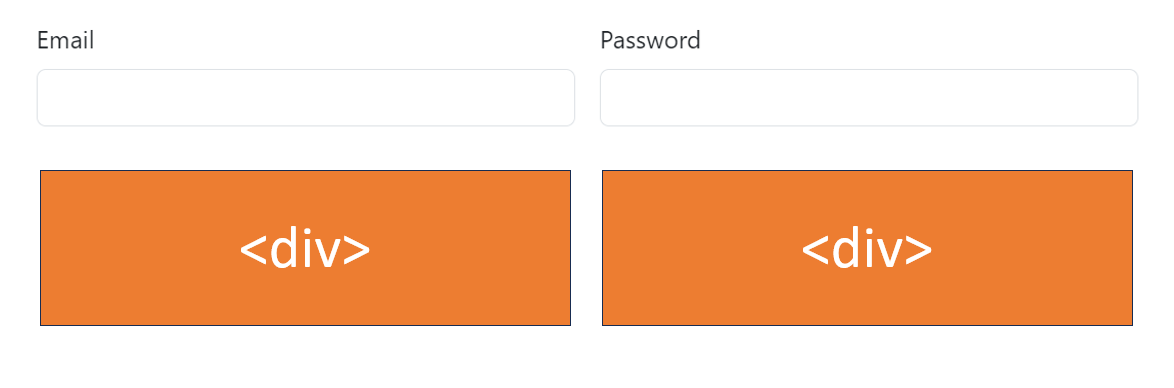
Below is the sample code using Bootstrap:
<!DOCTYPE html>
<html lang="en">
<head>
<meta charset="UTF-8" />
<meta name="viewport" content="width=device-width, initial-scale=1.0" />
<title>div tag in html</title>
<link
href="https://cdn.jsdelivr.net/npm/bootstrap@5.3.1/dist/css/bootstrap.min.css"
rel="stylesheet"
integrity="sha384-4bw+/aepP/YC94hEpVNVgiZdgIC5+VKNBQNGCHeKRQN+PtmoHDEXuppvnDJzQIu9"
crossorigin="anonymous"
/>
</head>
<body>
<form class="row g-3">
<div class="col-md-6">
<label for="inputEmail4" class="form-label">Email</label>
<input type="email" class="form-control" id="inputEmail4" />
</div>
<div class="col-md-6">
<label for="inputPassword4" class="form-label">Password</label>
<input type="password" class="form-control" id="inputPassword4" />
</div>
</form>
<script
src="https://cdn.jsdelivr.net/npm/bootstrap@5.3.1/dist/js/bootstrap.bundle.min.js"
integrity="sha384-HwwvtgBNo3bZJJLYd8oVXjrBZt8cqVSpeBNS5n7C8IVInixGAoxmnlMuBnhbgrkm"
crossorigin="anonymous"
></script>
</body>
</html>